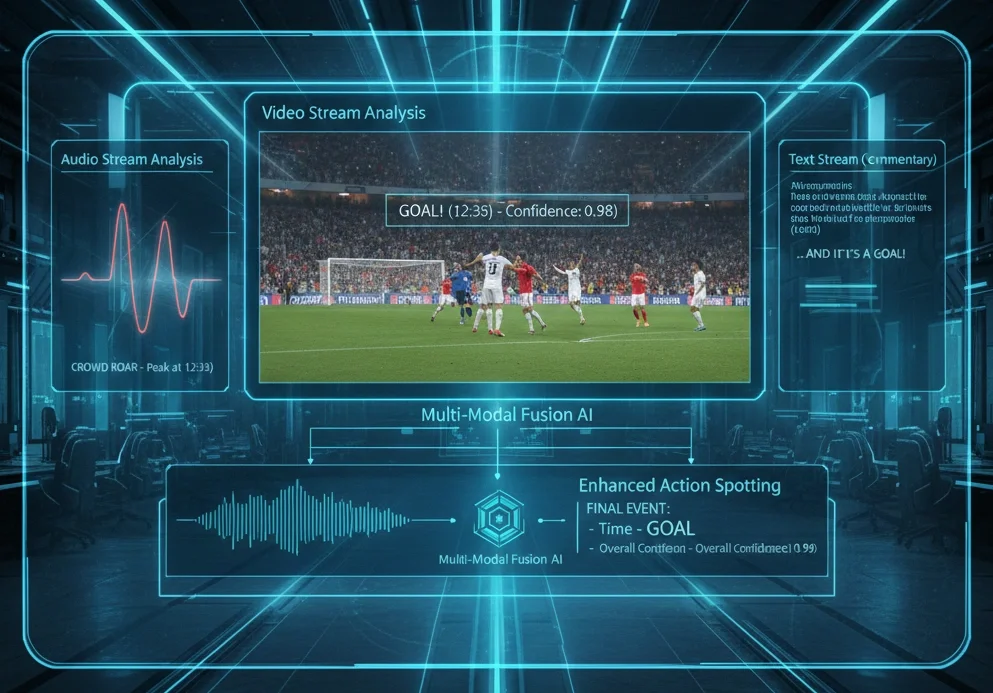
Never miss "what happened when. "Action Spotting's frontiers and practical tips from Playbox
Hello! I'm Chihiro Nakatani, an intern at Playbox. I'm currently pursuing a PhD focusing on human behavior recognition research (CVIU2026・CVPR2024・ICCV2023).
This time, I'll provide a concise explanation of "Action Spotting"—a topic gaining significant attention in the field of sports analysis in recent years—covering everything from its technical background to key points for practical implementation.
Table of Contents
- What is Action Spotting?
- SoccerNet at CVSports
- Utilizing Action Spotting in Playbox
- Summary and Future Outlook
1. What is Action Spotting?
While conventional Video Classification aims to identify "what is happening in the entire video," Action Spotting is the task of pinpointing "when" and "which action" occurred within a long video. In sports footage, actions (events) like shots are fleeting moments. The goal of Action Spotting is to detect these "instantaneous events" along the timeline with high accuracy and identify their timestamps.
SoccerNet Example of Action Spotting in Video
Action Spotting can be applied to various fields, including creating highlight reels, tactical analysis, player evaluation for scouting, and fan engagement.
2. Action Spotting at CVSports
When discussing sports analysis, the SoccerNet dataset and benchmark are unavoidable. The CVSports workshop at CVPR, one of the premier international conferences in computer vision, hosts various competitions using this dataset. Additionally, the upcoming CVSports (CVPR2026) in June will feature an invited talk by Playbox CEO Atom Scott. Stay tuned!
2.1 SoccerNet dataset
It consists of footage from over 500 matches collected from major European leagues. In recent years, beyond Action Spotting, state recognition (GSR) – which identifies each person's role (field player, goalkeeper, referee, etc.) and positional information – has also become a crucial technology for tactical analysis and play evaluation. Playbox is also participating in the GSR competition at CVSports (CVPR2025).
2.2 Annotations for Action Spotting
SoccerNet defines 17 action classes as detection targets for Action Spotting. The timestamps when these 17 action classes occur are annotated on each video. Classifying these 17 classes based on action type and the features required for detection yields the following:
[Shooting-related Actions]
- Goal・Shots on target・Shots off target
- Key Features: "Ball trajectory" and "Goal net movement"
[Kick-type Actions]
- Indirect free-kick・Direct free-kick・Kick-off・Corner・Clearance・Throw-in
- Key Features: "Ball Position" and "Player Formation"
[Judgment & Other]
- Offside, Penalty, Foul, Yellow card, Red card, Yellow->red card, Substitution, Ball out of play
- Key Features: "Referee gestures" and "Detailed movement information for specific players"
2.3 Evaluation Metrics
Action Spotting uses mAP (mean Average Precision) to evaluate how accurately it predicted when (timestamp) the target action occurred. If the predicted timestamp falls within a certain time window (within δ seconds) of the ground truth, it is considered correct. AP (Average Precision) is then calculated for each class based on precision and recall.
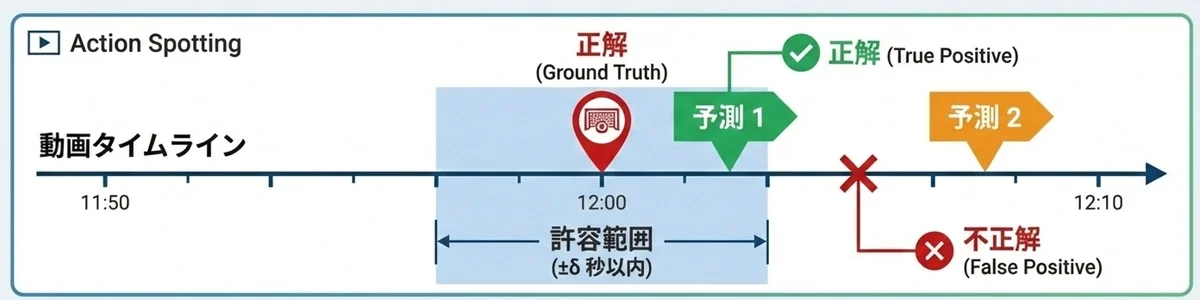
Success/Failure Determination for Action Spotting Detection Results
2.4 Baseline Models
T-DEED: Temporal-Discriminability Enhancer Encoder-Decoder for Precise Event Spotting in Sports Videos demonstrates exceptionally strong performance in Action Spotting. This method, presented at CVsports '24, acquires temporal features from videos composed of L frames while detecting for each frame "whether an action is occurring" and "which action is occurring."As shown in the figure below, the vast number of frames where "no action is occurring" presents one of the challenges in training.
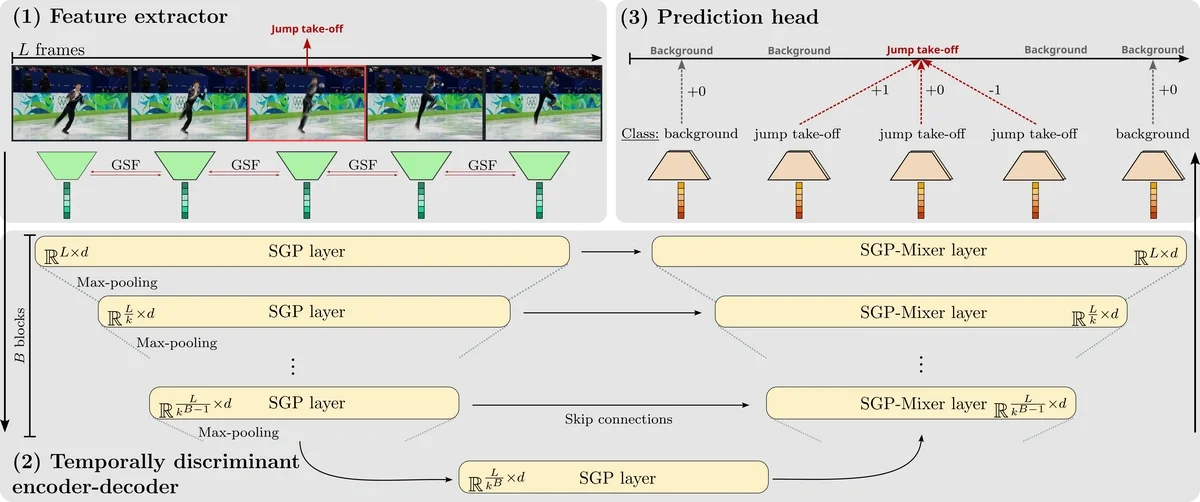
T-DEED Overview Diagram (https://arturxe2.github.io/projects/T-DEED/)
Looking at the actual results of training SoccerNet's Action Spotting with T-DEED, we see that the mAP is around 60-80, indicating relatively high detection performance.
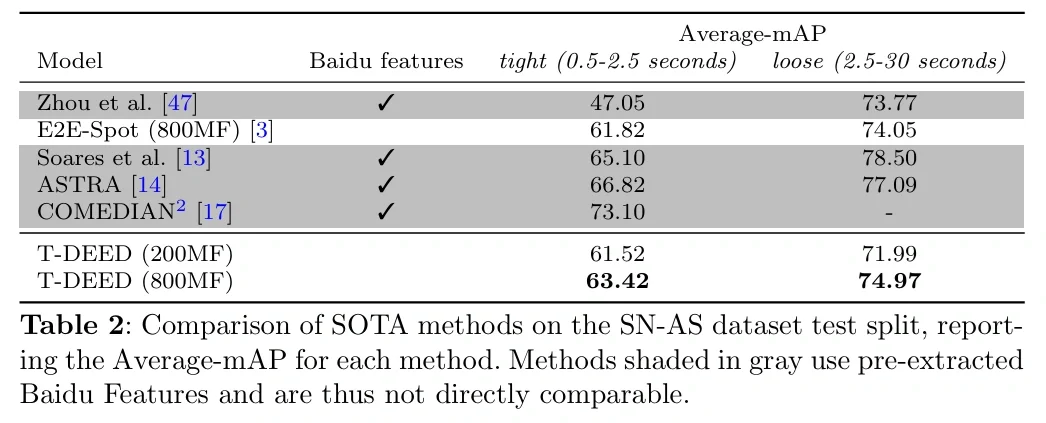
mAP on the SoccerNet dataset (https://arturxe2.github.io/projects/T-DEED/)
However, since SoccerNet videos are broadcast footage, the shooting environments between videos are similar, making training relatively easy even with limited data. Therefore, the next section introduces an actual training example using a Playbox camera, which is expected to capture footage in various environments different from SoccerNet.
3. Action Spotting with Playbox Camera
The Playbox Camera is designed for filming in diverse environments, resulting in greater differences in shooting conditions between videos compared to SoccerNet. This study investigated the required data volume and other factors for Action Spotting using videos captured in such varied environments.
3.1 Overview of the Dataset
Here we introduce the specific contents of the dataset used in this study.
3.1.1 Playbox Camera Video Data
Footage captured by Playbox Camera preserves the realism of actual matches, capturing the entire pitch or specific plays. An example video is shown below.
Example of Playbox Camera footage
3.1.2 Action Classes
This time, we focused on the following six classes in soccer matches.
| Class Name | Description |
| ck | Corner Kick |
| kick off | kick off |
| goal | goal scene |
| shot | shoot |
| FK | Free kick |
| PK | Penalty Kick |
3.1.3 Annotation Method
Manual annotation was performed by human annotators. Each video was reviewed frame-by-frame, and timestamps were recorded for specific actions (e.g., the moment the ball was kicked, the moment it crossed the goal line).
3.1.4 Data Scale
The total amount of data used for analysis is as follows.
-
Total number of videos: 345
-
Annotation Units: Occurrence points for the above 6 classes within each video
Using these datasets, we have established the foundation for automatically extracting match highlights and generating statistical data from Playbox Camera footage.
3.2 Results
Training with 345 videos yielded the result that "the system is very strong at recognizing plays with specific patterns, but there is room for improvement in handling sudden movements." In particular, it detects kickoffs and set plays with relatively high accuracy.
3.2.1 mAP Results
First, we examine the mAP for each class.
| Class | mAP |
| Overall Average | 0.43 |
| kick off | 0.71 |
| shot | 0.59 |
| ck (Corner Kick) | 0.51 |
| fk (Free Kick) | 0.39 |
| goal | 0.38 |
| pk (Penalty Kick) | 0.00 |
3.2.2 Observations from the Results
-
"Set pieces" are highly accurate
kick off(0.71) andck(0.51). These likely benefited from easier learning due to their clear pattern of "starting from a stationary player position." -
The difficulty of "goal" detection
goal(0.38) is a complex action involving two intertwined events: "taking a shot" and "that shot resulting in a goal," making learning more difficult.
3.2.3 Visualization of Inference Results (Video)
Please view video examples of actual shot and ck detections.
Shot Detection Results in Playbox Camera Footage
Ck detection results in Playbox camera footage
3.3 Detailed Analysis
3.3.1 Data Volume (Number of Annotations) and mAP
"How many annotations are needed to achieve high accuracy?" is one of the most common questions. To summarize, increasing the number of videos (annotations) improves mAP, but saturation begins at a certain point. The chart below shows the actual number of videos and mAP for the shot class, clearly demonstrating that the efficiency of accuracy improvement slows as the number of videos increases.
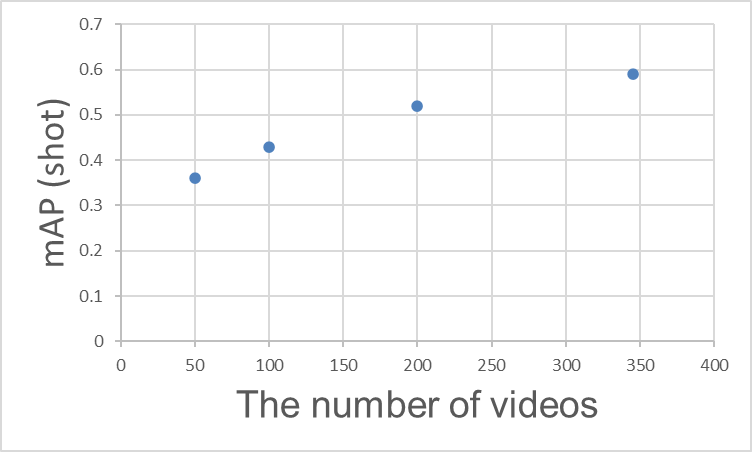
Relationship Between Training Video Count and mAP (shot)
3.3.2 Frame Rate (FPS) and mAP
In Action Spotting, the number of frames in a video is crucial for understanding the scene context essential for detection. For example, detecting a goal requires not only the visual of the ball hitting the net but also leveraging supplementary scene context like the celebrating team or the disappointed opposing team.
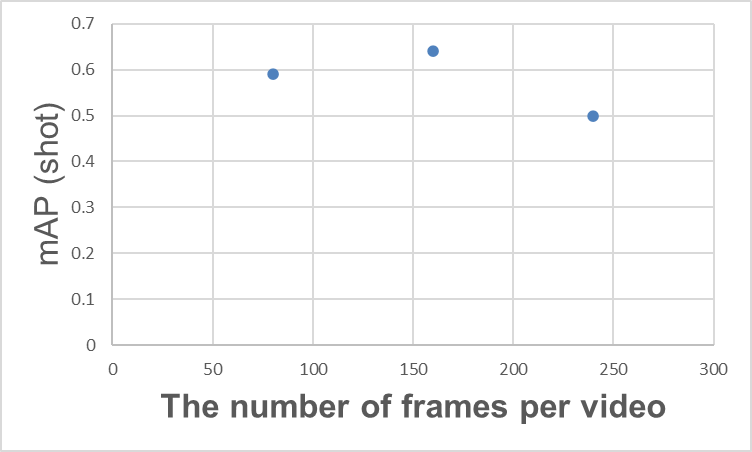
Relationship between the number of frames in a video and mAP (shot)
One might conclude that "simply increasing the number of frames per video is sufficient"... but this is not necessarily the case. For example, as shown in the graph above, increasing the number of frames per video may cause mAP to saturate at a certain point, after which mAP may decrease. Similar results are documented in the T-DEED paper (Table 6 (d)). While various causes are possible, one reason is likely that while increasing the number of frames provides more information, it also makes learning more difficult.
Increasing the number of frames per video also increases the computational load required for inference. Therefore, adjusting the number of frames per video based on the required performance, inference speed, and the type of action being targeted is expected to contribute to performance improvement.
3.4 Playbox Trial and Error
3.4.1 Fixed FPS Setting for T-DEED
First, we verified whether "overfitting could occur for a specific single video." Normally, if the model is correctly constructed, it should perfectly fit a small amount of data. However, the result was a failure. Even when focusing on a single video, the accuracy did not improve at all. Investigation revealed an unexpected blind spot.
The cause was that the video's FPS (frame rate) was fixed internally within TDEED, diverging from the actual FPS of the Playbox video. In recognizing sequential actions, a mismatch in the flow of time (FPS) is critical. Upon noticing this specification and properly adjusting the FPS setting to match the Playbox video format, learning progressed successfully.The fundamental debugging principle of "first checking for overfitting at the smallest unit" ultimately became the shortcut to discovering this fundamental specification error.
3.4.2 Effects of Pre-trained Models and Data Augmentation
As insights, we also document attempts made to improve accuracy that proved ineffective.
-
Fine-tuning the SoccerNet Pre-trained Model: We fine-tuned a pre-trained SoccerNet model, but it did not yield noticeable accuracy improvements for the Playbox videos in this case.
-
Application of Data Augmentation: We tried all data augmentation options configurable in TDEED, but this also had almost no impact on the results.
4. Summary and Future Prospects
Thank you for reading this far!
Key Points This Time
- Action Spotting is a technology that detects "when" and "what" occurred.
- SoccerNet is a well-known broadcast video dataset, and various methods like T-DEED have been proposed.
- We evaluated Action Spotting performance using footage captured by Playbox cameras.
Future Prospects
Future work will focus on achieving higher performance through multi-modal Action Spotting that combines not only video but also audio (cheering volume) and text (commentary data).